
In today’s digital world, managing social media is no longer just about posting photos or replying to comments. Businesses need powerful tools to handle multiple platforms, track performance, and engage with their audience efficiently. That’s where Meta Business Suite comes in.
If you’re a beginner and want to understand what Meta Business Suite is, how it works, and how you can use it to grow to your business, this guide is for you.
What is Meta Business Suite?

Meta Business Suite is a free tool developed by Meta Platforms that helps businesses manage their Facebook and Instagram accounts in one place.
- Create and schedule posts
- Reply to messages and comments
- Track performance insights
- Run ads
- Manage multiple accounts
In simple words, Meta Business Suite acts like a control panel for your social media business activities.
Why is Meta Business important?
If you are running a business or planning to start one online, managing multiple social media platforms manually can be time-consuming. Meta Business Suite solves this problem by bringing everything together in one dashboard.
Key Benefits:
- Saves time with scheduling tools
- Improves customer interaction
- Provides valuable analytics
- Helps in better decision-making
- Supports business growth
Whether you are a freelancer, small business owner, or digital marketer, this tool is extremely useful.
Features of Meta Business Suite
Let’s explore the main features that make Meta Business Suite powerful.
1. Content Creation and Scheduling
You can create posts for both Facebook and Instagram at the same time.
- Schedule posts in advance
- Plan your content calendar
- Maintain consistency
This feature is especially helpful for businesses that want to stay active without posting daily.
2. Unified Inbox
Managing messages from different platforms can be confusing. Meta Business Suite provides a single inbox where you can:
- Reply to Facebook messages
- Respond to Instagram DMs
- Manage comments
This helps improve customer engagement and response time.
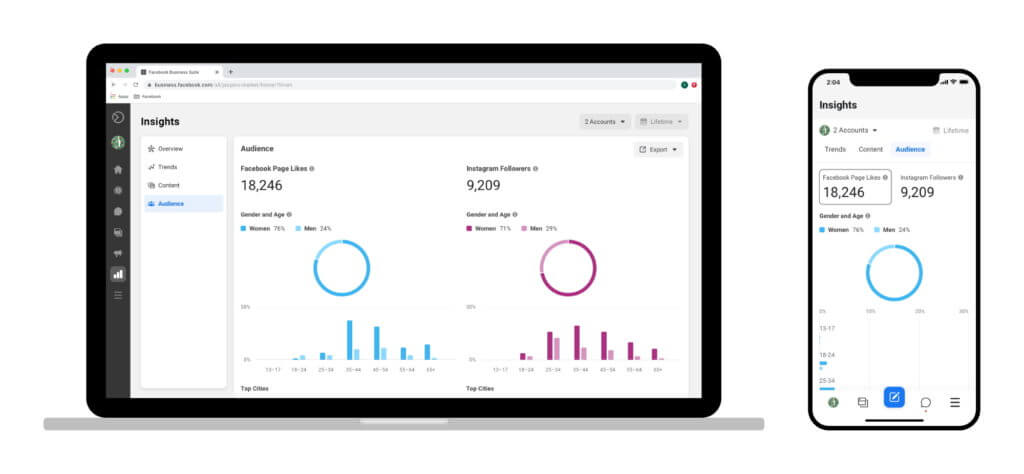
3. Insights & Analytics
Data is very important in digital marketing. Meta Business Suite provides detailed insights such as the following:
- Reach and impressions
- Engagement rate
- Audience demographics
- Post performance
These insights help you understand what is working and what needs improvement.
4. Ad Management
You can create and manage ads directly from the platform.
- Boost posts
- Create ad campaigns
- Monitor performance
This makes it easier to run paid marketing campaigns without switching tools.
5. Multi-Account Management
If you manage multiple pages or clients, Meta Business Suite allows you to:
- Switch between accounts easily
- Manage multiple Facebook pages
- Handle multiple Instagram accounts
This is very useful for agencies and social media managers.
How to Access Meta Business?
Getting started with Meta Business Suite is very simple.
Step 1: Login
Go to the official website of Meta Business Suite and log in using your Facebook account.
Step 2: Connect Your Accounts
- Link your Facebook page.
- Connect your Instagram account
Step 3: Start Managing
Once connected, you can start creating posts, replying to messages, and analyzing data.
How to Use Meta Business Tool (Step-by-Step)
Let’s understand how beginners can use this tool effectively.
Step 1: Create a Post
- Click on “Create Post.”
- Choose Facebook, Instagram, or both
- Add text, images, or videos
- Click “Publish” or “Schedule.”
Step 2: Schedule Content
- Select a future date and time
- Plan weekly or monthly content
- Maintain consistency
Step 3: Manage Message
- Open the Inbox section
- Reply to messages and comments
- Use saved replies for faster responses
Step 4: Check Insights
- Go to the Insights tab
- Analyze your performance
- Track growth
Step 5: Run Ads
- Select the “Ads” section
- Choose your objective
- Set the budget and audience
- Launch campaign
Meta Business Suite vs Meta Business Manager
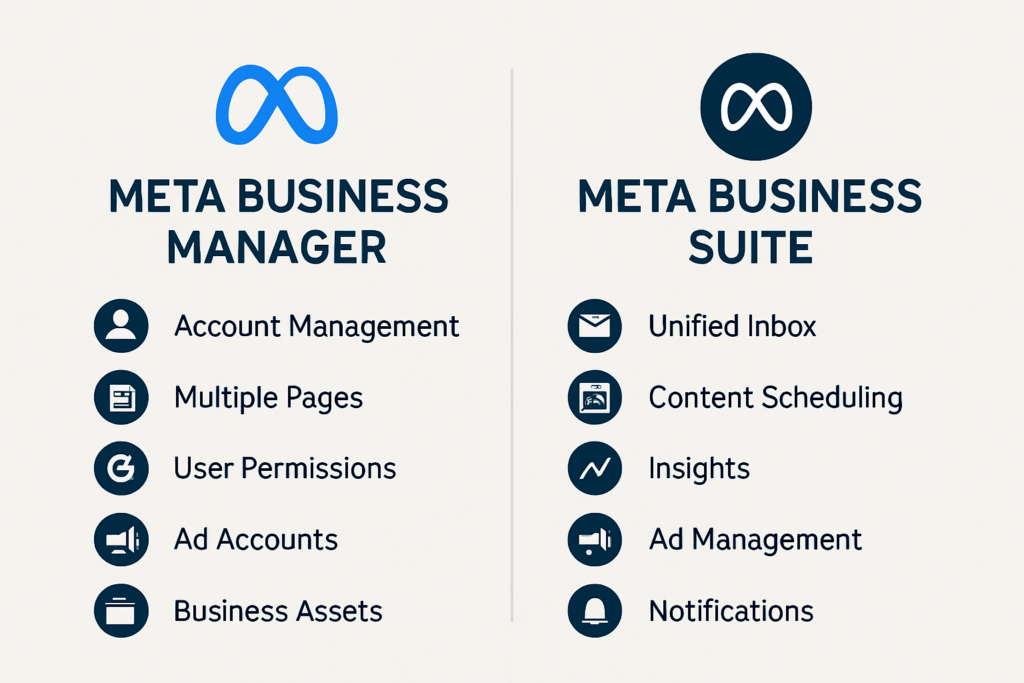
Many beginners get confused between Meta Business Suite and Business Manager.
Meta Business Suite:
- Easy to use
- Beginner-friendly
- Focus on content and engagement
Business Manager:
- Advanced tool
- Used for managing permissions
- Better for large businesses
For beginners, Meta Business Suite is the best starting point.
Who Should Use Meta Business Suite?
This tool is perfect for:
- Small business owners
- Freelancers
- Digital marketers
- Social media managers
- Agencies
If you want to grow your online presence, this tool is a must.
Advantages of Meta Business Suite
Here are some major advantages:
1. Free Tool
You don’t need to pay anything to use it.
2. Easy to Use
Simple interface for beginners.
3. Time Saving
Manage everything in one place.
4. Better Engagement
Quick replies improve customer satisfaction.
5. Data-Driven Decisions
Insights help in improving strategy.
Disadvantages of this Suite
No tool is perfect. Here are some limitations:
- Limited advanced features compared to paid tools
- Occasional bugs or slow performance
- Requires an internet connection
- Learning curve for complete beginners
Tips to Use Meta Business Effectively
If you want to get the best results, follow these tips:
1. Plan Your Content
Create a content calendar in advance.
2. Stay Consistent
Post regularly to stay active.
3. Engage with the audience.
Reply to comments and messages quickly.
4. Use Insights
Analyze data and improve strategy.
5. Experiment with Ads
Try small budgets and scale gradually.
Common Mistakes to Avoid
Beginners often make these mistakes:
- Posting without planning
- Ignoring messages
- Not checking analytics
- Using too many hashtags
- Running ads without a strategy
Avoiding these mistakes can help you grow faster.
Meta Business Suite for Marketing Guide
Meta Business Suite plays a major role in digital marketing.
Organic Marketing
- Posting content
- Engaging with the audience
- Building brand awareness
Paid Marketing
- Running ads
- Targeting audience
- Generating leads
It combines both organic and paid strategies in one platform.
Future of Meta Business Suite
With the growth of social media, tools like Meta Business Suite are becoming more advanced.
In the future, we can expect:
- AI-based recommendations
- Better automation
- Improved analytics
- Advanced ad targeting
Meta is continuously updating its platform to support businesses.
Conclusion
Meta Business Suite is one of the most powerful tools for managing social media platforms like Facebook and Instagram. Whether you are a beginner or an experienced marketer, this tool can simplify your work and improve your results.
From content creation to analytics and advertising, everything is available in one place. The best part is that it is completely free and easy to use.
If you are serious about growing your business online, learning Meta Business Suite is a must.
FAQs
1. Is Meta Business Suite free?
Yes, it is completely free to use.
2. Can I use it for Instagram?
Yes, you can manage Instagram and Facebook together.
3. Is it good for beginners?
Yes, it is very beginner-friendly.
4. Can I run ads from it?
Yes, you can easily create and manage ads.
5. Do I need technical skills?
No, basic knowledge is enough to start.