In today’s digital world, it is important to understand how people use your website. Whether you have an e-commerce store, a blog, a startup, or a business website, knowing where your visitors come from, what they do on your site, and how they interact with your content can help you make better business decisions.
Earlier, many businesses used Universal Analytics (UA) to track website traffic and user activity. But as technology has changed, people now use websites and mobile apps, switch between different devices, and expect a better online experience. To meet these new needs, Google introduced Google Analytics 4 (GA4).
GA4 is the latest version of Google Analytics. It helps you understand how users interact with your website and mobile app. Instead of only tracking page views and sessions, GA4 focuses on user actions, called events, and shows the complete journey of a visitor. This gives businesses a better understanding of customer behaviour.
In this guide, you will learn what Google Analytics 4 (GA4) is, how it works, its main features, its benefits, and why it is important for businesses in 2026.
Understanding GA4
GA4 stands for Google Analytics 4, the newest version of Google Analytics designed to replace Universal Analytics.
Unlike previous versions, GA4 uses an event-based tracking model rather than a session-based approach.
This may sound technical, but it changes how data is collected.
Traditional analytics focused on:
- Sessions
- Pageviews
- Bounce rates
- Traffic sources
GA4 focuses on:
- User interactions
- Events
- Engagement
- Cross-device behaviour
- Customer journeys
This approach gives marketers a clearer picture of how people actually interact with digital properties.
For example:
Instead of only knowing that someone visited your homepage, GA4 can tell you:
- Which buttons did they click
- How far they scrolled
- Which videos did they watch
- Whether they downloaded a file
- Their path before making a purchase
This provides more meaningful data for decision-making.
Why Google Introduced GA4
The internet has changed significantly over the past decade.
Users no longer browse on a single device.
A customer may:
- Discover a product on mobile
- Research it on a tablet
- Purchase from desktop
Traditional analytics struggled to track this behaviour accurately.
Privacy regulations have also evolved:
- GDPR
- Cookie restrictions
- Data privacy laws
- Browser limitations
GA4 was created to solve these challenges.
It uses:
- AI-powered insights
- Flexible tracking
- Cross-platform reporting
- Privacy-focused measurement
This makes it more future-ready.

Key Features of GA4
GA4 includes several powerful features that make it different from previous analytics systems.
1. Event-Based Tracking
One of the biggest changes in GA4 is event tracking.
Everything in GA4 is treated as an event.
Examples include:
- Page views
- Clicks
- Scrolls
- Purchases
- Video plays
- Downloads
- Form submissions
Instead of relying heavily on sessions, GA4 captures individual user actions.
This creates a detailed customer journey.
2. Enhanced Measurement
GA4 automatically tracks important interactions without needing extra coding.
Enhanced measurement can collect:
- Scroll tracking
- Outbound link clicks
- Site search
- Video engagement
- File downloads
- Page views
This saves time and simplifies setup.
3. Cross-Platform Tracking
Many businesses operate:
- Websites
- Android apps
- iOS apps
GA4 allows tracking all of these in one property.
This creates a unified view of users across multiple platforms.
4. AI and Predictive Analytics
One of GA4’s most exciting features is machine learning.
GA4 can predict:
- Purchase probability
- Churn probability
- Revenue forecasts
- User behaviour trends
These insights help marketers make smarter decisions.
For example:
An online store can identify users likely to purchase in the next week and target them with ads.
5. Better User Journey Tracking
Traditional analytics often created fragmented reports.
GA4 helps visualise the customer journey:
Awareness → Engagement → Purchase → Retention
You can understand how users move through your site and identify where they drop off.
6. Custom Reports
GA4 includes an Explore section that allows advanced reporting.
You can build:
- Funnel reports
- Path exploration reports
- Segment analysis
- Cohort reports
This gives greater flexibility than previous versions.
7. Privacy-Centered Tracking
Privacy concerns are increasing worldwide.
GA4 was designed for a cookieless future.
Features include:
- Data controls
- Consent mode
- Flexible retention settings
- Reduced dependency on cookies
This helps businesses adapt to changing regulations.
How GA4 Works
To understand GA4, think of it as a system that records actions.
Every interaction becomes an event.
For example:
A visitor enters your website.
GA4 records:
Page View Event
Then they click a product:
Click Event
They scroll:
Scroll Event
Watch a video:
Video Start Event
Purchase:
Purchase Event
All these events combine into a complete customer journey.
This creates a much richer understanding of user behaviour.
GA4 Event Categories
GA4 events generally fall into four groups.
Automatically Collected Events
These events are tracked automatically.
Examples:
- First visit
- Session start
- User engagement
Enhanced Measurement Events
Automatically enabled tracking such as:
- Scroll tracking
- Video interactions
- Downloads
Recommended Events
Google suggests events based on industry needs.
Examples:
- Login
- Sign up
- Purchase
- Add to cart
Custom Events
Businesses can create custom actions.
Examples:
- Button clicks
- Contact form submissions
- Booking interactions
Custom events allow deeper analysis.
Important GA4 Metrics
Understanding key metrics is essential.
Users
Shows how many people visited your website.
Sessions
Represents groups of interactions within a time period.
Engagement Rate
Measures meaningful user activity.
This replaces traditional bounce rate as a primary metric.
Average Engagement Time
Shows how long users actively interact with your site.
Events
Tracks all recorded actions.
Conversions
Important business goals such as:
- Purchases
- Leads
- Signups
GA4 vs Universal Analytics
Let’s compare the two systems.
| Feature | Universal Analytics | GA4 |
|---|---|---|
| Tracking Model | Session-based | Event-based |
| Cross-device Tracking | Limited | Advanced |
| Machine Learning | Minimal | Extensive |
| Privacy Features | Basic | Advanced |
| App + Website Tracking | Separate | Unified |
| Reporting | Static | Flexible |
| Predictive Metrics | No | Yes |
GA4 provides significantly more capabilities.
Benefits of Using GA4
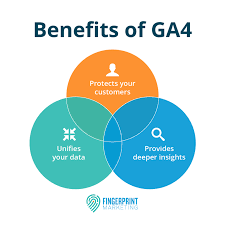
Advantages of Google Analytics 4
Better Customer Understanding
GA4 shows complete user journeys rather than isolated sessions.
Smarter Marketing Decisions
You can identify:
- Top channels
- High-performing content
- User behaviour trends
Improved ROI
Better data leads to improved campaign performance.
Future-Proof Analytics
GA4 prepares businesses for:
- Privacy changes
- AI advancements
- Multi-device usage
More Accurate Attribution
Users often interact through multiple channels before converting.
GA4 helps determine which marketing channels contribute most.
How Businesses Use GA4
Different industries use GA4 differently.
eCommerce Stores
Track:
- Product views
- Cart additions
- Purchases
- Revenue
Bloggers
Measure:
- Reader engagement
- Content performance
- Traffic sources
Service Businesses
Analyse:
- Lead generation
- Form submissions
- Appointment requests
Mobile Apps
Understand:
- App installs
- User retention
- In-app behavior
Setting Up GA4
Getting started is relatively straightforward.
Step 1
Create a Google Analytics account.
Step 2
Create a GA4 property.
Step 3
Add your website details.
Step 4
Install the tracking code.
This can be done using:
- Google Tag Manager
- Website plugins
- Manual installation
Step 5
Verify data collection.
Check real-time reports.
Common Reports in GA4
Real-Time Report
Shows live visitors.
Useful for testing.
Acquisition Report
Shows where traffic originates:
- Google Search
- Social media
- Email campaigns
- Direct traffic
Engagement Report
Tracks:
- User activity
- Popular pages
- Events
Monetization Report
For online stores:
- Purchases
- Revenue
- Product performance
Retention Report
Shows how frequently users return.
Common Challenges Beginners Face
Many users initially find GA4 confusing.
Common reasons include:
Different Interface
GA4 looks very different from Universal Analytics.
Missing Familiar Metrics
Traditional metrics like bounce rate have changed.
Event Setup Complexity
Advanced tracking may require setup knowledge.
Learning Curve
GA4 provides more flexibility but takes time to master.
Tips for Using GA4 Successfully
Define goals early
Know what success means:
- Sales
- Leads
- Signups
Set up conversions
Track meaningful business actions.
Use Google Tag Manager
Simplifies implementation.
Explore custom reports
Standard reports only tell part of the story.
Connect with other tools
Integrate:
- Google Ads
- Search Console
- BigQuery
Future of Analytics with GA4
Analytics is moving toward:
- AI-powered insights
- Privacy-first measurement
- Predictive behaviour analysis
GA4 sits at the centre of this transformation.
As third-party cookies decline and user behaviour becomes more complex, businesses need smarter systems.
GA4 was built specifically for this future.
Conclusion
Google Analytics 4 is far more than an update to traditional analytics. It represents a complete shift in how businesses understand customer behaviour.
Instead of relying on sessions and pageviews alone, GA4 focuses on user interactions, events, and complete customer journeys.
Its advanced capabilities—such as event tracking, machine learning, predictive insights, and privacy-focused measurement—help organisations make more informed decisions.
While the interface and reporting system may feel unfamiliar at first, learning GA4 is an investment that pays off. Businesses that understand their audience better can create stronger marketing strategies, improve customer experiences, and increase growth opportunities.
As digital marketing continues evolving, GA4 is becoming an essential tool for marketers, business owners, bloggers, and analysts looking to succeed in the modern online landscape.
FAQ
1. What is Google Analytics 4 (GA4)?
Google Analytics 4 is Google’s latest web and app analytics platform that helps businesses track user behavior, website performance, and marketing effectiveness across multiple devices and platforms.
2. Why did Google replace Universal Analytics with GA4?
GA4 was designed to provide more accurate cross-platform tracking, privacy-focused measurement, AI-powered insights, and event-based data collection compared to Universal Analytics.
3. What is the main difference between GA4 and Universal Analytics?
The biggest difference is that GA4 uses an event-based data model, while Universal Analytics relied primarily on sessions and pageviews.
4. Is Google Analytics 4 free to use?
Yes. GA4 is free for most businesses and website owners, making it one of the most popular analytics tools available.
5. What can GA4 track?
GA4 can track:
- Website traffic
- User engagement
- Conversions
- E-commerce transactions
- App activity
- Events and interactions
- Marketing campaign performance
6. What is an event in GA4?
An event is any user interaction that GA4 records, such as page views, clicks, form submissions, video plays, downloads, or purchases.
7. What are conversions in GA4?
Conversions are important actions you define as business goals, such as purchases, lead submissions, newsletter signups, or contact form completions.
8. How does GA4 help digital marketers?
GA4 helps marketers understand audience behavior, measure campaign effectiveness, improve user experiences, and make data-driven decisions.
9. Can GA4 track both websites and mobile apps?
Yes. GA4 is designed to track user activity across websites and mobile applications within a single property.
10. What are GA4 properties?
A property is the container that collects and organises data from your website, app, or digital platform.